

Heck! Where is my URL? The mysterious case of Google Apps Script web apps in V8

De-ploy-ment. What a beautiful word! One of those terms that, without a doubt, instantly makes you feel like your code is finally spreading its wings in the cloud... or about to hit a massive brick wall. 😅
You’ve got your frontend polished, your backend is solid, you proudly click the Deploy button in the modern Apps Script IDE, copy the URL ending in /exec, and...
And that is exactly where the Greek tragedy begins—the moment you realize you're about to become the involuntary helpdesk for your own creation.
If you’ve ever tried to distribute a Google Sheets template linked to a Web App with the noble intention of letting non-technical users use it without losing their minds, you know exactly what I’m talking about.
The traditional setup is a medieval torture device: forcing a teacher, an HR manager, or a colleague to copy the Web App URL from the deployment screen, open the spreadsheet, find the "Settings" sheet, and paste it there just so the system can generate, say, a dynamic QR code for attendance.
Why on earth are we still dragging this analog copy-paste workflow around in 2026? Shouldn't the script be smart enough to know who it is, where it lives, and what its own production URL is?
Today, we are going to dissect why Apps Script hides its own identity under the V8 engine, and how to solve it using a first-execution self-registration pattern that provides a practical and reliable solution—minus the headache of configuring standard GCP projects 😏.
⏱️ TL;DR (For the impatient developer)
- The drama: In V8, calling ScriptApp.getService().getUrl() outside of a live HTTP context (e.g., from the IDE editor, triggers, or google.script.run) returns a useless
/devor outdated URL. - The bug: It's heavily starred on Google's Issue Tracker, and the Sandboxed Iframe (SOP) prevents you from reading
window.top.locationfrom the frontend. - The fix: We intercept the real
/execURL inside thedoGet(e)simple trigger handler during the very first real execution (where V8 does know the real URL) and lock it forever inside ScriptProperties. - The result: Completely zero-touch setup for your non-technical users. They copy your template, deploy, and click the link once to auto-configure the entire system.
Table of Contents
🛑 The "dreaded" ScriptApp.getService().getUrl() bug
In the classic IDE (yes, the one that now belongs in a museum), retrieving your Web App's URL was as simple as calling ScriptApp.getService().getUrl().
And it worked. Every single time. The runtime knew exactly if it was running in production or development. Cool!
But with the advent of the new IDE and concurrent versioned deployments, Google's execution engine decided that stability was way too boring. Now, if you call that method in your V8 backend, it will happily hand you the URL ending in /dev (the testing environment), or maybe some ghost deployment ID from three versions ago.
This erratic behavior is well-documented, heavily starred, and generally mourned in Google's official Issue Tracker ⭐. You can join the club, read the comments, or drop your star to push for a fix on this official tracker thread.
"Fine, I'll just read it from the frontend with JavaScript", you might think.
OH, you sweet, innocent summer child! 😅 Grab a coffee ☕ (you’re going to need it) and welcome to the Google security fortress.
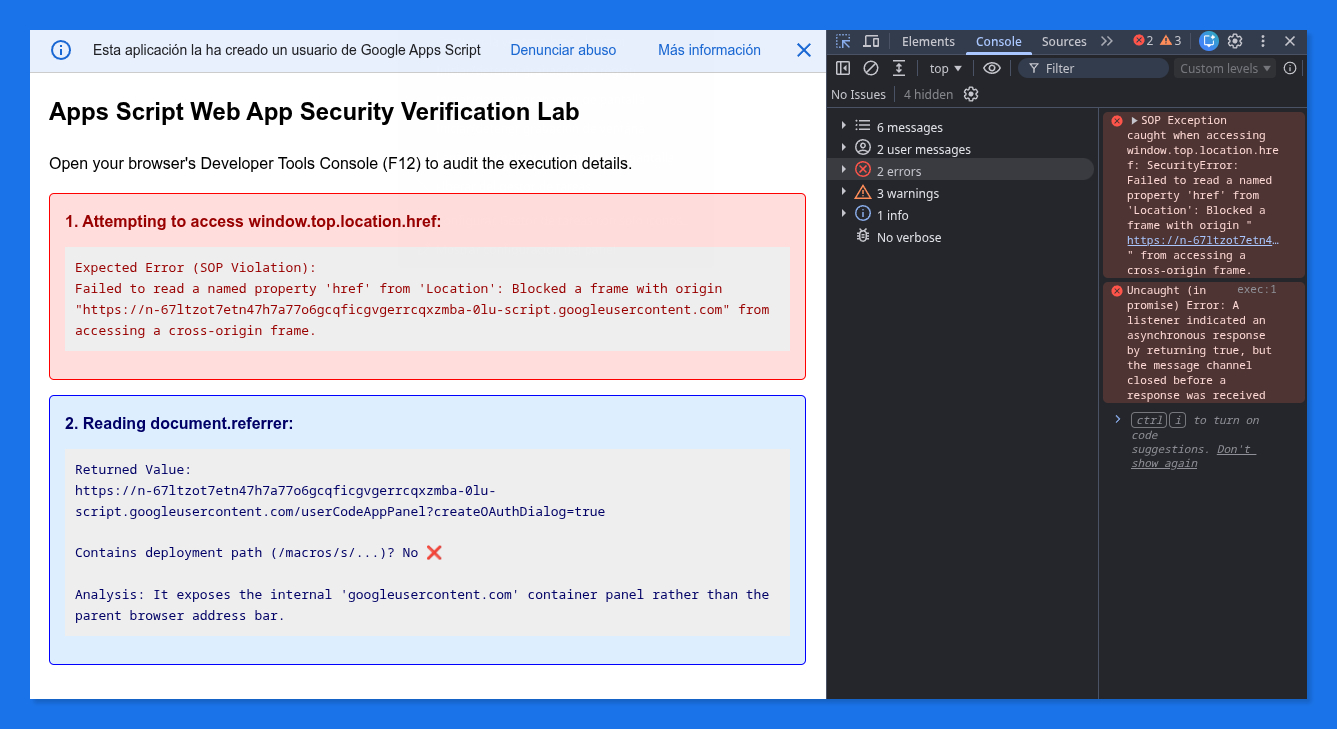
As you probably know, the Apps Script HTML Service (HtmlService) serves your frontend inside a sandboxed iframe hosted under a secure googleusercontent.com subdomain. This prevents your code from messing with the parent DOM of Google. Because of the Same-Origin Policy (SOP), if you even dare to execute window.top.location.href to see what's on the browser's address bar, your console will scream at you with a security error of biblical proportions.
What about document.referrer? Nice try! But if you audit this in a testing environment, you will discover that it returns something like:
https://n-67ltzot7etn47...script.googleusercontent.com/userCodeAppPanel
Instead of exposing the parent browser address bar with the public deployment path, it returns the URL of the internal googleusercontent.com sandboxed container. The crucial /macros/s/{DEPLOYMENT_ID}/exec token we strive to grasp is completely stripped away by Google's secure proxy layer.
We are completely in the dark. Or so we thought.
Want to audit this security wall yourself? You can deploy this minimal "verification lab" in your own environment to see the Same-Origin Policy (SOP) error and the sandboxed referrer in action.
➤ Code.gs
function doGet() {

  return HtmlService.createHtmlOutputFromFile("Index")
    .setTitle("URL Restriction Verification Lab")
    .setXFrameOptionsMode(HtmlService.XFrameOptionsMode.ALLOWALL);

}
➤ Index.html
<!DOCTYPE html>
<html>

  <head>
    <base target="_top">
    <style>
      body { font-family: Arial, sans-serif; margin: 20px; line-height: 1.6; }
      .box { border: 1px solid #ccc; padding: 15px; margin-bottom: 15px; border-radius: 5px; }
      .error { background-color: #fdd; border-color: #f00; color: #900; }
      .success { background-color: #dfd; border-color: #0f0; color: #060; }
      .info { background-color: #def; border-color: #00f; color: #006; }
      pre { background: #eee; padding: 10px; overflow-x: auto; white-space: pre-wrap; }
    </style>
  </head>

  <body>
    <h2>Apps Script Web App Security Verification Lab</h2>
    <p>Open your browser's Developer Tools Console (F12) to audit the execution details.</p>

    <!-- Test 1: window.top.location.href -->
    <div id="test-top" class="box">
      <strong>1. Attempting to access window.top.location.href:</strong>
      <pre id="res-top">Running test...</pre>
    </div>

    <!-- Test 2: document.referrer -->
    <div id="test-referrer" class="box">
      <strong>2. Reading document.referrer:</strong>
      <pre id="res-referrer">Running test...</pre>
    </div>

    <script>
      // 1. Verify window.top.location.href restriction
      try {
        // This will trigger a Same-Origin Policy (SOP) security exception
        const topUrl = window.top.location.href;
        const elTop = document.getElementById("res-top");
        elTop.textContent = "Unexpected Success! Managed to read: " + topUrl;
        elTop.parentElement.classList.add("success");
      } catch (error) {
        console.error("SOP Exception caught when accessing window.top.location.href:", error);
        const elTop = document.getElementById("res-top");
        elTop.textContent = "Expected Error (SOP Violation):\n" + error.message;
        elTop.parentElement.classList.add("error");
      }

      // 2. Verify document.referrer behavior
      try {
        const referrer = document.referrer;
        const elRef = document.getElementById("res-referrer");

        if (referrer) {
          const hasMacroPath = referrer.includes("/macros/");
          elRef.textContent = "Returned Value:\n" + referrer +
            "\n\nContains deployment path (/macros/s/...)? " +
            (hasMacroPath ? "Yes ✅" : "No ❌") +
            "\n\nAnalysis: It exposes the internal 'googleusercontent.com' container panel rather than the parent browser address bar.";
          elRef.parentElement.classList.add("info");
        } else {
          elRef.textContent = "No referrer detected (Empty string).";
        }
      } catch (error) {
        console.error("Exception caught when reading document.referrer:", error);
        document.getElementById("res-referrer").textContent = "Unexpected Error: " + error.message;
      }
    </script>

  </body>

</html>
And here is the empirical proof. Notice how the parent deployment URL is completely gone, leaving only the internal container origin:
Want to skip the manual setup and test this security fortress immediately? Grab your copy of the verification lab project right here (click the small document icon 📄 at the top right):
👉 Google Apps Script Security Verification Lab Project
🏛️ What about the orthodox approach? (The Apps Script API)
If you talk to a Google Workspace purist, they might tell you: "Hey, why don't you just query the official Google Apps Script API?"
Technically, they are right. The Google Apps Script REST API exposes the projects.deployments endpoints, allowing your backend to list all active iterations and programmatically look up the URLs.
However, using the official API completely destroys our primary goal: creating a seamless, zero-touch distribution template for end-users. Implementing the orthodox approach introduces two major, user-defeating friction points:
- Global User Settings Requirement: Every single user who copies your template must manually navigate to their Apps Script User Settings and make sure that the Google Apps Script API switcher is set to "ON".
- GCP Project Overhead: You can no longer rely on the default, invisible Google Cloud Project bundled with the script. You are forced to manually link the script to a standard GCP Project, configure the Google Cloud Console, and enable the Apps Script API inside that specific project.
If you are distributing public Google Sheets templates to non-technical users like teachers, accountants or HR managers, the Google Cloud Console setup can be a major friction point. That is exactly why we replace the traditional process with our seamless self-registration method.
💡 The "aha!" moment: It’s all about the doGet(e) context
While digging into runtime behaviors under the V8 engine, I stumbled upon a curious little quirk. It turns out that ScriptApp.getService().getUrl() isn’t broken by design; it’s just highly sensitive to execution context.
If you trigger the function from the Apps Script editor, a time-driven trigger, or an asynchronous google.script.run client-side call, the V8 engine gets disoriented and defaults back to the /dev URL.
BUT, if the code is executed under the context of an actual incoming HTTP request hitting the production endpoint, V8 engine has all the data it needs. Whenever doGet(e) is actively handling a live production request, ScriptApp.getService().getUrl() successfully resolves the real /exec URL with the correct deployment ID.
Bingo! If we can intercept that elusive URL during the very first real load on the server and lock it in, we’ve solved the riddle forever.

🛠️ The solution: the "self-registration" pattern (zero-touch)
The strategy is beautifully simple: when the user opens the Web App for the first time right after deploying it (which they will always do to test it), we capture the URL in the backend and save it permanently in the script's metadata (ScriptProperties).
From that moment on, any subsequent execution—even outside the HTTP request scope—only needs to read that saved property.
A quick design note before we look at the code: this pattern was originally born in the trenches while building a Web App that used a bound Google Sheet as its backend database and settings panel. To make that project a truly zero-touch experience, the code below actively attempts to write its captured URL directly into a spreadsheet tab. However, if you are running a standalone script or simply don't need spreadsheet synchronization, you can safely strip out the SpreadsheetApp try-catch block. The core registration logic will still work like charm.
⚠️ Crucial permission warning: For this self-registration pattern to succeed, the thread executing the request must have write permissions to both the ScriptProperties service and the bound spreadsheet. This means your Web App must be configured to "Execute as: Me" (the developer/owner). If you deploy it to "Execute as: User accessing the web app", any non-editor accessing the web app will trigger a silent authorization wall (and a permission exception in your logs) when trying to write to the project's properties or the sheet.
Here is the battle-tested backend code you need to drop into your Code.gs:
➤ Code.gs
/**
 * Automatically initializes and registers the web app's production URL.
 * Runs silently in the background inside doGet(e).
 * Assumes that the web app has been deployed to run as the script’s owner.
 *
 * @return {string} The active web app URL (/exec or /dev).
 */
function registerAndGetUrl() {

  const properties = PropertiesService.getScriptProperties();
  let registeredUrl = properties.getProperty("WEBAPP_URL");

  // Retrieve the URL under the current execution context
  const currentUrl = ScriptApp.getService().getUrl();

  // If the current URL is a production one (/exec) and is new or has changed
  if (currentUrl && currentUrl.indexOf("/exec") !== -1 && currentUrl !== registeredUrl) {

    // 1. Persist the URL in Script Properties for internal backend tasks
    properties.setProperty("WEBAPP_URL", currentUrl);
    registeredUrl = currentUrl;
    console.log("⚡ [Auto-Reg] Registered new production URL: " + currentUrl);

    // 2. OPTIONAL: Write the URL directly into your linked Google Sheet
    try {
      const ss = SpreadsheetApp.getActiveSpreadsheet();
      if (ss) {
        const configSheet = ss.getSheetByName("⚙️ Settings") || ss.getSheets()[0];
        configSheet.getRange("B2").setValue(currentUrl);
        console.log("📊 URL successfully synchronized with Google Sheets.");
      }
    } catch (err) {
      console.warn("No bound spreadsheet found or unable to write: " + err.message);
    }
  }

  // Fallback to the current URL (likely /dev) if production hasn't been hit yet
  return registeredUrl || currentUrl;

}

/**
 * Entry point that serves your Web App
 */
function doGet(e) {

  const template = HtmlService.createTemplateFromFile("Index");

  // Resolve and register the production URL completely silently
  const baseUrl = registerAndGetUrl();

  // Inject the URL into the template (only if the client actually needs to display it)
  template.webAppUrl = baseUrl;

  return template.evaluate()
    .setTitle("My Auto-Configured Web App")
    // Prevents X-Frame-Options headaches when embedding in sites or iframes
    .setXFrameOptionsMode(HtmlService.XFrameOptionsMode.ALLOWALL);

}
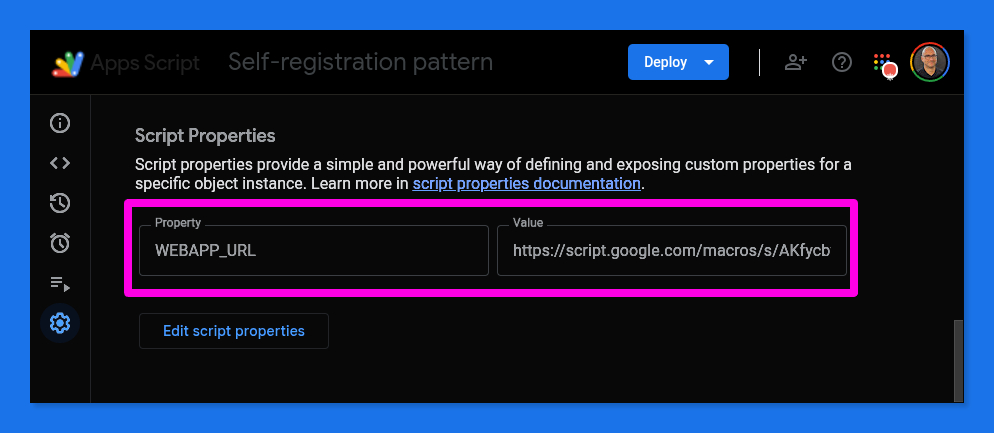
Once a user loads the Web App for the very first time, go check your Apps Script Project Settings. You will find that our backend code has silently initialized and stored the production endpoint right inside your script’s metadata:
Performance audit
At this point, any seasoned software architect will look at the registerAndGetUrl() function and raise a red flag: "Wait a minute, you are invoking ScriptApp.getService().getUrl() and reading from ScriptProperties on EVERY single HTTP request! Isn't that going to bottleneck your performance?"
It is a very valid concern. Let's break down the actual overhead under the hood:
- The ScriptApp lookup:
Calling ScriptApp.getService().getUrl()requires an infrastructure resolution that adds roughly 30 to 50 ms to the thread. - The string comparison: Evaluating
currentUrl !== registeredUrlin RAM takes less than 1 millisecond. - The Script Properties read: Reading from
PropertiesServiceinvolves an internal Remote Procedure Call (RPC) within Google's cloud infrastructure, which usually introduces a slight latency of 30 to 70 ms. - The Write execution: The expensive operations (writing to properties and Google Sheets cells) are completely isolated behind our conditional statement. They only execute once on the very first request to a new deployment.
Given that a typical Apps Script Web App serving HTML with template compilations rarely loads in under 500 ms, adding 60 to 120 ms of total context lookup (plus a few negligible milliseconds of internal V8 engine routing overhead) is virtually invisible to the end user.
Extreme optimization: entering the CacheService
However, if you are building an API endpoint or a high-traffic system where every single millisecond is sacred, you can bypass the properties RPC call entirely by introducing an additional caching layer using Google's CacheService.
Because reading from the script cache is blazing fast compared to the persistent property layer, you can rewrite the engine to keep the runtime overhead close to absolute zero:
➤ Code.gs
/**
 * Highly optimized URL registration leveraging CacheService for low latency.
 */
function registerAndGetUrlOptimized() {
  const cache = CacheService.getScriptCache();

  // 1. Instant check against high-speed volatile cache
  let registeredUrl = cache.get("WEBAPP_URL");

  // 2. Fallback to global properties if cache expired
  if (!registeredUrl) {
    const properties = PropertiesService.getScriptProperties();
    registeredUrl = properties.getProperty("WEBAPP_URL");
    if (registeredUrl) {
      cache.put("WEBAPP_URL", registeredUrl, 21600); // Keep cached for 6 hours
    }
  }

  const currentUrl = ScriptApp.getService().getUrl();

  // 3. Evaluate and self-register on deployment shifts
  if (currentUrl && currentUrl.indexOf("/exec") !== -1 &&; currentUrl !== registeredUrl) {
    const properties = PropertiesService.getScriptProperties();
    properties.setProperty("WEBAPP_URL", currentUrl);
    cache.put("WEBAPP_URL", currentUrl, 21600);
    registeredUrl = currentUrl;
    console.log("⚡ [Cached Auto-Reg] Registered new deployment: " + currentUrl);

    // 4. OPTIONAL: Write the URL directly into your linked Google Sheet
    try {
      const ss = SpreadsheetApp.getActiveSpreadsheet();
      if (ss) {
        const configSheet = ss.getSheetByName("⚙️ Settings") || ss.getSheets()[0];
        configSheet.getRange("B2").setValue(currentUrl);
      }
    } catch (e) {}
  }

  return registeredUrl || currentUrl;
}
🧠 An architectural reality check (Don't over-engineer!): Looking at the code above, your micro-optimization reflex might suggest nested if statements to short-circuit the cache and property lookups, preventing them from running during IDE or /dev executions. While technically true, nesting those blocks makes the code significantly less readable. Since this logic only skips overhead during development or testing environments—where a 50 ms saving has zero impact on end-users—maintaining a clean, readable, and sequential code layout is vastly superior to chasing ghost milliseconds in non-production environments. Keep your critical production paths tight, but prioritize clarity where it matters most.
What about the HTML frontend?
If you look closely at the doGet(e) function in our previous backend code, you will notice we evaluate the HTML file via HtmlService and dynamically assign our registered URL to the template engine:
template.webAppUrl = baseUrl;
This is how we safely bridge the gap between our newly registered server-side properties and the client.
In most production environments, your frontend is completely oblivious to this registration process and doesn't need to know its own URL to do its job. However, if you are building a dashboard, a setup screen, or if your client-side JavaScript needs to use this URL to build dynamic redirection paths, you can passively capture that injected variable.
Since we already bound webAppUrl on the server-side, you can read it seamlessly in your Index.html:
➤ Index.html
<!DOCTYPE html>
<html>
  <head>
    <base target="_top">
    <script>
      // The V8 engine parses this tag on the server before rendering
      const WEB_APP_URL = "<?= webAppUrl ?>";
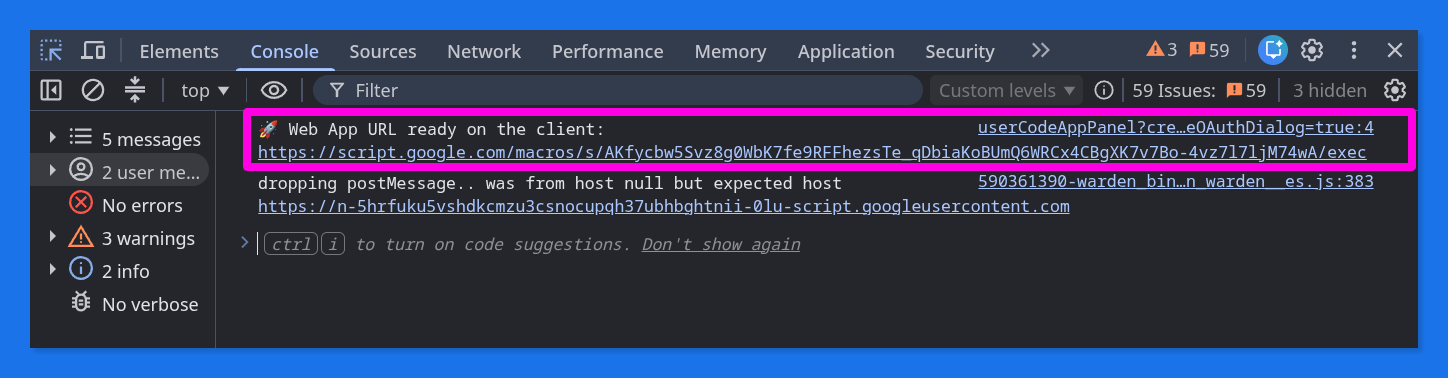
      console.log("🚀 Web App URL ready on the client:", WEB_APP_URL);
    </script>
  </head>
  <body>
    <!-- Your amazing HTML layout goes here -->
  </body>
</html>
Check your browser’s console right after loading the app. You'll see that despite all sandboxing security proxy barriers, we’ve safely bypassed the wall to render the exact endpoint path:
Too lazy to manually piece everything together? (Don't worry, we've all been there! 😉) I have prepared a fully functional playground for you. You can directly copy the complete Apps Script project with both the backend logic and the frontend template pre-configured from this public template:
👉 Google Apps Script Live Project Template
🏆 The result: a remarkably slick workflow
By adopting this pattern, the "How to Install" section in your project's README shrinks from a scary, NASA-like technical manual down to three elegant steps (okay, maybe we are being slightly dramatic here, but let us have our little Savior of Devs moment, shall we? 😅):
- Make a copy of the template.
- Deploy the Web App (New Deployment > Web App > Anyone, or restricted to your organization's domain).
- Click the resulting
/execlink to open it for the first time.
And boom! The moment the page loads, the Web App configures itself: it silently talks to the Apps Script backend, saves its own URL to Script Properties (or writes it directly to a spreadsheet cell), and instantly updates a giant QR code ready to be projected on a screen for students or employees. No clipboard. No copy-pasting. Zero friction.

Sometimes, the best optimization isn't about writing more complex code; it's about understanding how the underlying infrastructure "thinks" and making it work for you.
Happy coding... and may all your future deployments be this remarkably slick! ⚡😏
Comentarios