

Shattering the JDBC Bottleneck in Apps Script V8: From 30 Minutes to Seconds

⚡ TL;DR
Apps Script V8 kills standard JDBC loops, crawling at just 3–5 records/second. By forcing your database to package data using native JSON (e.g., FOR JSON PATH) and parsing it in V8, you can jump to 142 records/second, fetching and writing 48,161 records in 338 seconds (a 98%+ database speedup!).
Table of Contents
- Oh boy!
- The Root of the Issue: The Expensive Runtime Boundary
- The Code Pattern That Breaks V8
- The Secret Sauce: Offloading the Work to SQL Server via JSON
- Rebuilding the Table in Apps Script
- Production Guardrails: Security & Resource Management
- Real-World Case Study: Production Impact
- Know Your Limits: The Memory Trade-Off
- Final Musings & Key Takeaways
Oh boy!
If you have ever migrated a Google Apps Script project from the good-old Rhino runtime to the modern V8 engine, you probably expected a massive, out-of-the-box speed boost. After all, Google promised us the wonders of Chrome's ultra-fast Just-In-Time compiler.
And let's face it, clinging to the past is no longer an option. Google officially scheduled the hard shutdown of the legacy Apps Script runtime on or after January 31, 2026, as outlined in their official V8 Migration Guide. Mind you, Google’s administrative tolerance is famously elastic—a handful of my own legacy Rhino scripts defiantly kept chugging along in the wild until the end of May 2026, proving that Google's executioners are either incredibly polite or just appreciate a highly generous grace period. But the axe has finally fallen for good.
For those of us who rely on relational databases via the JDBC service, that migration was a cold shower. Scripts that used to fetch 50,000 records in a comfortable 2/3-minute window suddenly started hitting the dreaded 30-minute execution limit, leaving our spreadsheets empty and our schedules ruined.
What went wrong? And more importantly, how did we manage to slash those execution times by over 98% using a clever JSON packaging trick directly on the database side? Let's dive in.
The Root of the Issue: The Expensive Runtime Boundary
To understand why V8 is so sluggish with JDBC, we don't need to guess Google's proprietary infrastructure specs. Instead, we can look at the observable behavior, which points to a classic architectural bottleneck: runtime boundary overhead.
Under the hood, Google Apps Script's JDBC service relies on Java-based database connectivity drivers.
Back in the Rhino days, the JavaScript engine itself ran on the JVM (Java Virtual Machine). Because your script and the database driver lived in the same runtime "house," interacting with the database ResultSet was practically direct and carried negligible overhead.
But now, enter V8. The modern V8 engine runs in its own highly optimized, sandboxed execution environment. This means that every single call to a JDBC object now has to cross the boundary between your V8 script execution thread and Google's underlying database service layer.
Based on this black-box observation, we can form a highly plausible working theory: the modern engine is written in C++, while the JDBC service remains in Java. It seems likely that every single call to a JDBC object —like results.next() or results.getString()— now has to cross the translation boundary between your V8 script execution thread and Google's underlying database service layer.
While Google keeps the low-level implementation details of this translation layer close to its chest, the performance tax is undeniable. Crossing this boundary carries a heavy latency cost per call. It’s not about the sheer volume of data you are transferring; it's about how many times you make your code cross that border.
The Code Pattern That Breaks V8
In a classic JDBC script, we tend to loop through our database row by row, and then column by column:
// THE SLUGGISH APPROACH: A death sentence in V8
const data = [];
while (results.next()) { // 1 border crossing per row (50,000 times)
  const record = [];
  for (let col = 0; col < numCols; col++) { // 1 border crossing per cell (500,000 times!)
    record.push(results.getString(col + 1));
  }
  data.push(record);
}
For a modest table of 50,000 rows and 10 columns, this loop forces your script to cross the V8-to-JDBC boundary over 550,000 times!
🧐 A quick nuance for the purists out there: while both methods pay the exact same V8-to-Java transition toll, they are not computationally equal; results.next() is much heavier because it occasionally triggers actual network requests to fetch the next batch of rows from the database, while results.getString() merely reads already cached data from JVM memory. However, at this scale, it's the sheer number of bridge crossings that kills your execution time.
Each crossing takes only a fraction of a millisecond, but multiply that by half a million, and those micro-latencies pile up into a massive roadblock. No wonder the execution times hit a wall.
In my own tests, the raw database-to-V8 retrieval phase alone —exluding any spreadsheet writing— dragged along at an agonizing throughput of just 3 to 5 records per second. At that crawling pace, simply fetching 50,000 records would require anywhere between 2.8 and 4.6 hours of continuous execution time, instantly crushing any hope of surviving Google's strict 30-minute limit.
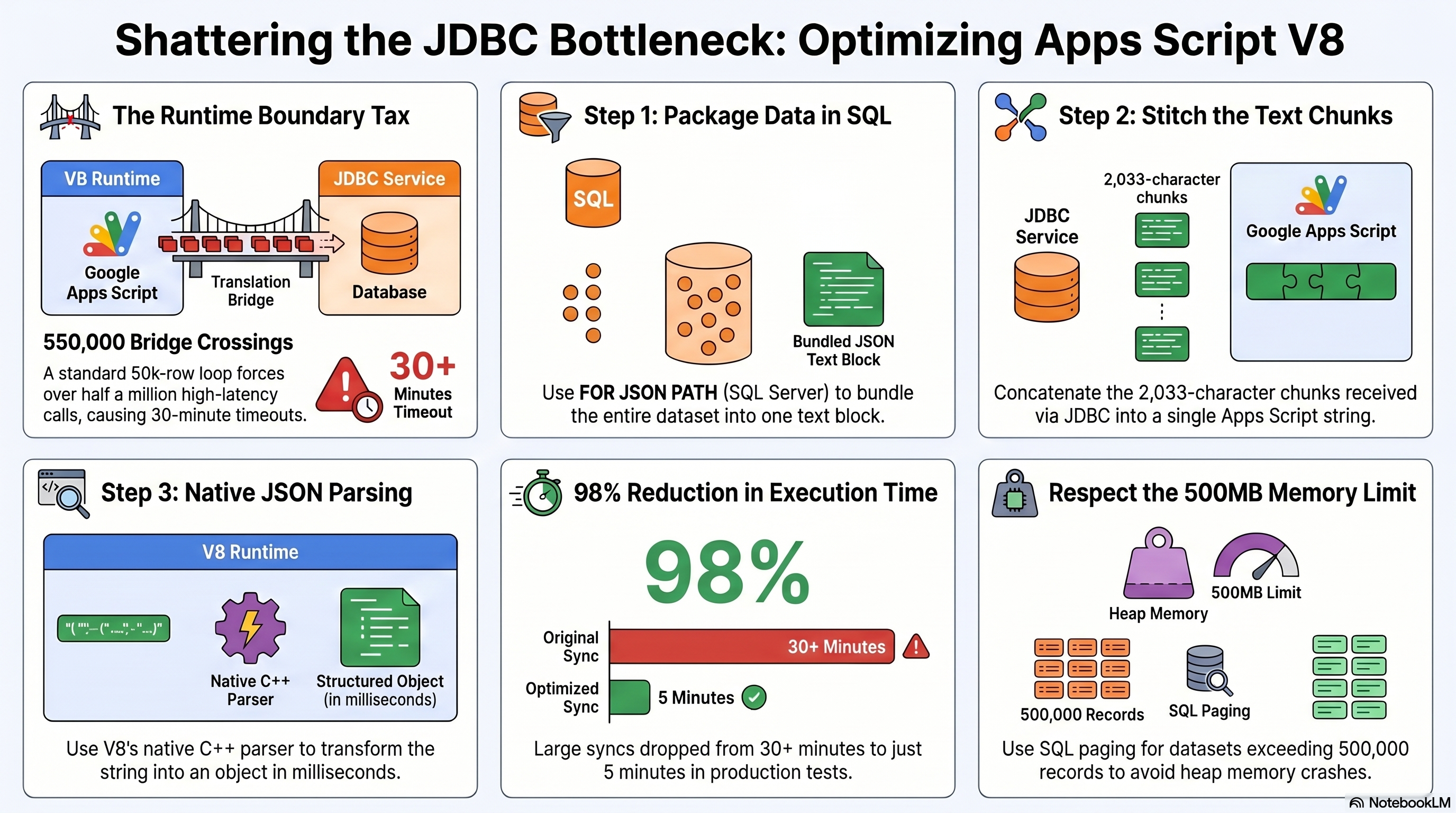
To help you visualize this architectural shift, here is a complete structural roadmap of how we can bypass this boundary tax entirely using SQL-side JSON packaging, chunk stitching, and native V8 parsing:
The Secret Sauce: Offloading the Work to SQL Server via JSON
The strategy here is simple: make fewer trips. Instead of asking for every single cell individually, what if we ask the database to package the entire dataset into a single, neat text block before sending it over?
If you are running Microsoft SQL Server (2016 or newer), you can delegate this entire packaging job to the database engine by appending FOR JSON PATH, INCLUDE_NULL_VALUES to the end of your SQL query.
-- OPTIMIZED SQL QUERY
SELECT
  id_coupon,
  signup_date,
  city,
  zip_code
FROM Coupons
FOR JSON PATH, INCLUDE_NULL_VALUES
Why are these directives so critical?
- FOR JSON PATH: Instructs SQL Server to format the entire tabular result set as a single, massive JSON array of objects.
- INCLUDE_NULL_VALUES: By default, SQL Server omits JSON keys for null database fields. Forcing their inclusion ensures that every single object in the array has the exact same keys, which is vital for rebuilding a clean, rectangular table in Google Sheets without alignment issues.
But what about other databases?
While FOR JSON PATH is a syntax exclusive to Microsoft SQL Server, you can achieve the exact same performance outcome in other modern database engines using their native JSON aggregation features:
-- PostgreSQL (9.4+): Wrap your selection in a JSON aggregation block.
SELECT json_agg(t) FROM (
  SELECT id_coupon, signup_date, city, zip_code FROM Coupons
) t;
--MySQL (5.7.22+): Use the JSON array and object creation functions.
SELECT JSON_ARRAYAGG(
  JSON_OBJECT(
    'id_coupon', id_coupon,
    'signup_date', signup_date,
    'city', city,
    'zip_code', zip_code
  )
) FROM Coupons;
No matter the engine, the core architectural paradigm remains the same:
Shift the structural assembly close to the database storage engine!
Rebuilding the Table in Apps Script
To maximize streaming performance and avoid buffering massive payloads in the server's memory, SQL Server formats and outputs JSON (and XML) directly into the Tabular Data Stream (TDS) protocol in chunks of exactly 2,033 UCS-2 characters (an architecture dating back to SQL Server 2000).
Because of this streaming design, any JSON payload longer than 2,033 characters is delivered as multiple rows of text. We only need a quick, highly efficient loop in Apps Script to stitch those pieces back together.
This reduces our bridge crossings from 550,000 to just a few thousand chunks. Once the JSON string is fully assembled, we close the JDBC connection to free up database resources and let V8 —which parses JSON natively in C++ at lightning speed— do what it does best.
Before the code, a relevant consideration on string concatenation performance. If you come from Java, C#, or older JavaScript engines, you might look at jsonString += chunk in a loop and shiver at the thought of string immutability overhead. But fear not! V8 is incredibly smart. It implements ConsStrings, i.e., creating hierarchical binary tree of pointers instead of copying memory on every iteration. With around 10,000 chunks, simple concatenation is actually faster and produces less garbage collection overhead than pushing elements to an array and running .join('') at the end.
// THE OPTIMIZED APPROACH: Secure prepare, stitch, parse, and dump
const conn = Jdbc.getConnection(dbUrl, user, password);

// We use placeholders (?) for any dynamic, user-controlled parameters
const sql = `
  SELECT
    id_coupon,
    signup_date,
    city,
    zip_code
  FROM Coupons
  WHERE signup_date >= ?
  FOR JSON PATH, INCLUDE_NULL_VALUES
`;

const stmt = conn.prepareStatement(sql);
// Bind the dynamic filter value safely to block injection vectors (1-indexed)
stmt.setString(1, '2026-01-01');

const results = stmt.executeQuery();

let jsonString = '';
while (results.next()) {
  jsonString += results.getString(1); // We only read 1 column containing the text chunks
}

// Close the JDBC resources immediately to release pool allocations
results.close();
stmt.close();
conn.close();

const data = [];
if (jsonString.length > 0) {
  // Parsing this in V8's memory takes milliseconds
  const jsonRows = JSON.parse(jsonString);
  const totalRows = jsonRows.length;

  if (totalRows > 0) {
    // Dynamically build headers from the keys of the first object
    const headers = Object.keys(jsonRows[0]);
    data.push(headers);

    // Map the JSON objects into a 2D array compatible with Sheets
    for (let i = 0; i < totalRows; i++) {
      const row = jsonRows[i];
      const record = [];
      for (let c = 0; c < headers.length; c++) {
        const field = headers[c];
        record.push(row[field] !== undefined ? row[field] : null);
      }
      data.push(record);
    }
  }
}

// Atomic write: one single network call to update the Sheet
sheet.clearContents();
if (data.length > 0) {
  sheet.getRange(1, 1, data.length, data[0].length).setValues(data);
}
Production Guardrails: Security & Resource Management
While the implementation above is highly optimized for raw speed, adapting this template for a production-grade system requires incorporating two critical software engineering guardrails:
🛡️ Preventing SQL Injection
Never interpolate dynamic user-controlled inputs directly into your query strings using string concatenation / replace. Instead, always leverage JdbcConnection.prepareStatement() and parameterize your inputs (as shown in the code block above).
Note that structural elements —such as dynamic table names or column headers— cannot be parameterized using SQL placeholders. If your application needs to dynamically switch databases, tables, or columns based on user interaction, you must validate those variables against a strict, hardcoded allowlist within your Apps Script application code before constructing your SQL statement.
🔌 Avoiding JDBC Connection Leaks
To keep the performance examples clean and digestible, comprehensive exception handling was omitted. However, in a live runtime environment, robust resource management is non-negotiable.
Because JDBC resources (like JdbcConnection, JdbcStatement, and JdbcResultSet) are low-level Java objects operating outside Google's standard JavaScript engine, they do not rely on the V8 garbage collector for timely reclamation. If an unhandled exception occurs (for instance, if JSON.parse() throws an error due to empty database contents), the code will crash, leaving these low-level sockets open.
Over time, these orphaned connections will leak and saturate your SQL Server's database connection pool, starving other business-critical applications of connections. You must wrap your production routines in a thorough try/catch/finally block, ensuring that results.close(), stmt.close(), and conn.close() are explicitly and sequentially called within the finally block to protect your database server.
Real-World Case Study: Production Impact
Let's talk real numbers. We put this optimization to the test in a demanding production environment with the following setup:
- The scenario: Downloading 48,161 records spread across 5 different databases/tables on a remote MS SQL Server, mapping the data, and writing them into separate tabs in Google Sheets.
- The old V8 approach: The script consistently timed out, crashing past the 30-minute mark and leaving us with half-baked reports. Given our observed data-transfer rate of 3 to 5 records/second, completing the sync was a mathematical impossibility.
- The SQL JSON approach: The entire process (including establishing 5 separate connections, downloading the chunks, parsing the JSON, and performing 5 atomic writes to Google Sheets) completed successfully in exactly 338 seconds (just over 5.5 minutes). If we isolate the pure database retrieval and parsing phase, this optimization represents an over 98% drop in active execution time, dropping from a projected 2.7 to 4.5 hours of cumulative, high-latency bridge looping to under 30 seconds of total native parsing, with the rest of the 338 seconds spent establishing sequential handshakes and performing the atomic Sheet writes.
Not only did we dodge the single-execution timeout limit, but we also protected our script's daily trigger runtime quotas (which restrict total automated trigger executions to 90 minutes or 6 hours per day) from being completely exhausted.
Know Your Limits: The Memory Trade-Off
Before you go and implement this strategy everywhere, let's talk about the elephant in the room: heap memory limits.
JSON.parse() is incredibly fast in V8 because it operates natively in C++. However, it does so by creating a massive tree of JavaScript objects directly in the RAM assigned to your script. Since Google Apps Script runs in shared, ephemeral containers, it has an empirical heap memory limit of about ~500 MB before the container crashes with an "Exceeded memory limit" error.
While this limit is undocumented in Google's official quotas list to the best of my knowledge, it represents a strong consensus in the developer community, frequently reported and heavily discussed on platforms like Stack Overflow and the Google Issue Tracker when scripts crash with the infamous "Exceeded memory limit" error (or might silently fail under microservices infrastructure limits in GCP).
Our 48,161 records generate a JSON string of roughly 10 MB, which uses around 50 MB of heap memory during parsing. This is well within the safety zone! However, if you scale to 500,000+ records, loading that massive string and parsing it in one single sweep might crash the script. If you are dealing with such massive datasets, consider implementing SQL paging (using the OFFSET and FETCH clauses) to download and parse the JSON in bite-sized chunks of 20,000 records at a time.
Final Musings & Key Takeaways
As developers, we are constantly being pushed to adapt to new runtimes and paradigms. But sometimes, the best way to move forward is to rethink how we move our data:
- Minimize the bridge crossings: When working with hybrid environments or serverless platforms like Apps Script, avoid loops that make repetitive calls to external APIs or bridge services.
- Let the database do the heavy lifting: Databases are incredibly optimized engines. If you can format, aggregate, or package your data close to the iron, do it. Your scripts will thank you.
Have you faced similar performance drops after migrating to V8? Let me know in the comments below!
Comentarios